


Accessibility profile
DFC Bridge targets WCAG 2.2 Level AA for final implementations. This profile turns that target into design, contract, implementation, and QA responsibilities. It does not claim that a Figma file alone can conform: conformance is evaluated on the complete product and all applicable WCAG 2.2 success criteria.
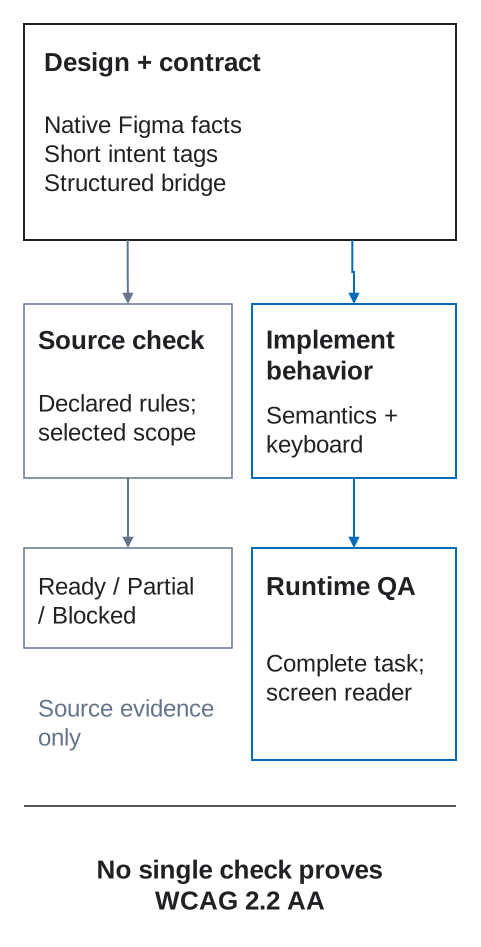
Design evidence, structured intent, semantic implementation, and user-facing tests are all required. No single layer proves accessibility.
Normative baseline
Section titled “Normative baseline”- Target WCAG version: 2.2.
- Target level: AA, including every applicable Level A and AA success criterion—not only the items summarized here.
- Scope: complete pages and processes, responsive and localized variants, authenticated states, errors, overlays, embedded content, and supported platforms.
- Accessibility-supported technologies: declared by the implementation team and tested with representative browsers and assistive technologies.
- Stronger product requirements in this profile remain required even when a WCAG exception would technically apply.
Use WAI-ARIA Authoring Practices for expected widget interaction patterns. Prefer native platform semantics and controls; ARIA does not repair an unsuitable interaction model.
Responsibility matrix
Section titled “Responsibility matrix”| Stage | Required evidence |
|---|---|
| Design | Reading order, names, labels, states, focus behavior, contrast, reflow, target size, alternatives, reduced motion. |
| Contract | Stable semantic roles/relationships, reaction focus and announcements, data equivalents, exceptions and owners. |
| Implementation | Native semantics, keyboard behavior, accessibility API exposure, preference handling, responsive behavior. |
| QA | Automated checks plus keyboard, zoom/reflow, screen-reader, contrast, motion, media, and task-based manual tests. |
Apply this matrix to each complete task, not just isolated controls. For example, opening a dialog requires a designed focus destination, a recorded restoration rule, a semantic implementation, and a keyboard/screen-reader test. Do not hand accessibility to the developer as unspecified cleanup or treat an automated scan as proof of conformance.
Semantics and reading order
Section titled “Semantics and reading order”A page contract identifies:
- one descriptive page title, document language, and language changes;
- landmarks for header, navigation, main content, complementary content, forms, and footer where appropriate;
- a logical heading hierarchy that describes sections rather than visual font sizes;
- lists, tables, quotations, labels, status, and relationships according to meaning;
- alternative text or an explicit decorative classification for images;
- meaningful DOM/accessibility order independent of visual positioning.
Use existing Figma structure, component source, stable names, [decor], and structured accessibility metadata as evidence. Do not create flat tags for every HTML element. The target adapter chooses native elements while preserving declared semantics.
Accessible names, labels, and descriptions
Section titled “Accessible names, labels, and descriptions”Every control and field has a programmatic name that matches or includes its visible label. Icon-only controls need an explicit stable name. Additional description connects instructions, units, constraints, error messages, and consequences without replacing the label.
Requirements:
- visible text is the default source of an accessible name;
- the same control keeps the same name across breakpoints and states unless its action changes;
- placeholder text is not a label;
- link text describes its destination in context;
- repeated “Learn more” links gain distinguishing context;
- status badges expose the status in text, not color alone;
- required fields and accepted formats are explained before failure;
- errors identify the field, cause, and correction when known.
A short [a11y-label=...] may clarify an icon-only link/control when the design source has no better property. Rich help, error, and relationship data belongs in the structured contract, not additional layer-name tags.
Keyboard and focus
Section titled “Keyboard and focus”All functionality must be usable from a keyboard or equivalent sequential input without a trap. The contract defines:
- logical Tab order based on semantic structure;
- widget-internal arrow-key behavior when a recognized pattern requires it;
- visible focus style in every theme and state;
- initial and restored focus for dialogs, drawers, menus, route changes, validation, deletion, and dynamic updates;
- skip or bypass mechanisms for repeated blocks;
- focus visibility when sticky headers, cookie banners, overlays, or scroll containers are present;
- alternatives to drag, path-based gestures, hover, and pointer-only actions.
Do not use positive tabindex or visual order as a substitute for correct source order. At Level AA, focused components must not be entirely hidden by author-created content under Focus Not Obscured (Minimum). DFC Bridge additionally requires intentional focus indicators rather than relying on uncertain browser/theme contrast.
Visual requirements
Section titled “Visual requirements”The implementation must meet, at minimum:
- text contrast of 4.5:1, or 3:1 for WCAG-defined large text;
- 3:1 contrast for essential user-interface components and graphical objects;
- information not conveyed by color alone;
- content usable at 200% text resize;
- reflow without two-dimensional page scrolling at a 320 CSS px equivalent width, except content that genuinely requires two-dimensional layout;
- no loss when users apply WCAG text-spacing overrides;
- support for portrait and landscape unless one orientation is essential;
- visible instructions that do not rely only on shape, color, sound, position, or sensory language.
Validate real rendered states, not token names. A color token called accessible-blue proves nothing against an actual background and opacity.
Target size and pointer input
Section titled “Target size and pointer input”WCAG 2.2 AA Target Size (Minimum) requires pointer targets to be at least 24 × 24 CSS px or satisfy one of its spacing/exception conditions. DFC Bridge recommends a 44 × 44 CSS px activation area for primary touch controls and uses the 24 px criterion as the non-negotiable AA floor.
Also define:
- sufficient separation of adjacent destructive or high-frequency targets;
- cancellation/undo for down-event activation where applicable;
- a non-drag alternative for drag operations;
- a single-pointer alternative to multipoint or path gestures;
- labels that remain visible and operable at narrow widths and zoom.
Do not enlarge only the painted icon while leaving a tiny activation box.
Forms, errors, and authentication
Section titled “Forms, errors, and authentication”Forms follow the state-machine contract and must provide:
- labels, instructions, purpose/autocomplete metadata where applicable;
- error identification and correction suggestions when known;
- an error summary and deterministic focus/announcement behavior for complex forms;
- review, confirmation, reversal, or checking for legal, financial, and data-changing submissions as required;
- preserved values after validation or server failure;
- no repeated entry of previously supplied information in the same process unless an allowed exception applies;
- authentication that does not depend only on a cognitive-function test, with password managers and paste supported.
A disabled submit button must not be the only indication that the form is incomplete.
Dynamic content and async status
Section titled “Dynamic content and async status”Loading, results, errors, background saves, connection changes, and other meaningful updates need visible feedback and, where appropriate, a polite or assertive live announcement. Declare:
- what is announced and when;
- whether existing content becomes busy, stale, or unavailable;
- how repeated updates are coalesced to avoid noise;
- whether focus stays in place or moves for a task-specific reason;
- how users discover inserted content;
- timeout extension, retry, and recovery controls.
Do not move focus merely to make a screen reader announce a status. Use a semantic status mechanism and preserve the user’s place whenever possible.
Data, charts, and complex visuals
Section titled “Data, charts, and complex visuals”Apply the data and visualization contract. Tables preserve header relationships; charts and maps have names, summaries, non-color encodings, keyboard-reachable interactions, and access to underlying values through a table/list/download where appropriate. Decorative visuals stay out of the accessibility tree.
A complex image needs an immediate short alternative plus nearby or linked detail sufficient to obtain the same essential information. The WAI complex-images tutorial provides official patterns.
Motion, time, flashing, and media
Section titled “Motion, time, flashing, and media”Apply the motion contract. Respect reduced-motion preference, preserve the task in a static fallback, provide controls for qualifying moving/auto-updating content, and never exceed the WCAG flash threshold.
For time limits, declare warning, extension, preservation, and re-authentication behavior. For prerecorded and live audio/video, provide the captions, audio description, transcript, media controls, and alternatives required by all applicable Level A/AA criteria. Autoplaying audio must be avoided or controllable under the applicable criterion.
Responsive transformations
Section titled “Responsive transformations”A responsive transformation must preserve:
- accessible name, role, value, state, and relationships;
- reading and focus order;
- keyboard and pointer task completion;
- errors, status, provenance, and help;
- access to content hidden behind disclosure;
- focus/history restoration when switching presentation.
A visual table-to-card or navigation-to-menu transformation is not semantic permission to remove headings, relationships, or actions. Test container-driven changes as well as viewport breakpoints.
Direction, writing mode, and bidirectional content
Section titled “Direction, writing mode, and bidirectional content”Accessibility review must include supported ltr/rtl directions and writing modes, not only translated strings. Preserve logical reading and keyboard order; do not force it to follow visual mirroring. Test mixed-direction people names, phone numbers, dates, ids, code, and digits; appropriate icon mirroring; chart axes and category order; focus indicators; error placement; and announcements. Use logical start/end relationships and declare the base direction of embedded values so assistive technology receives an intelligible sequence.
Structured accessibility metadata
Section titled “Structured accessibility metadata”Use structured metadata only for intent the source and components cannot express:
Non-standalone module fragment. This excerpt shows only
bridge.accessibilityand intentionally omits required envelope fields. Insert it into the requiredbridgeenvelope from the transfer contract before exchange or full-contract validation.
{ "bridge": { "accessibility": { "profile": { "standard": "WCAG", "version": "2.2", "level": "AA" }, "elements": [{ "element": "revenue-chart", "name": "Monthly revenue compared with target", "description": "Actual revenue exceeded target in 8 of 12 months", "details": "revenue-table", "readingOrder": ["chart-title", "chart-summary", "revenue-chart", "revenue-table"], "reducedMotion": "static-series", "testIds": ["a11y-chart-keyboard", "a11y-chart-values"] }] } }}This metadata supplements—not replaces—visible content and implementation semantics.
Required QA matrix
Section titled “Required QA matrix”At minimum, test representative complete tasks with:
- keyboard only, forward and reverse order, including overlays and failures;
- screen reader plus keyboard on the team’s declared accessibility-supported platform combinations;
- 200% text resize and 400% browser zoom/reflow at narrow equivalent width;
- text-spacing overrides and long localization;
- forced/high-contrast or platform contrast modes where supported;
- reduced motion and disabled/non-supported preferred animation mechanisms;
- pointer and touch target size, cancellation, gesture alternatives, and orientation;
- automated rules for detectable failures, followed by manual review;
- loading, empty, partial, stale, error, offline, validation, and permission states;
- each declared responsive transformation.
- supported RTL/bidirectional and writing-mode fixtures, including charts and mixed identifiers.
Record browser, platform, assistive technology/version, scenario, expected result, actual result, and evidence. Passing one screen reader/browser combination does not prove universal support.
Exceptions and conformance claims
Section titled “Exceptions and conformance claims”An exception record must identify the exact criterion or DFC Bridge requirement, affected scope, evidence, user impact, reason, owner, mitigation, approval, and review/expiry date. “Technical limitation” without evidence and a mitigation plan is not acceptable.
Do not claim WCAG conformance for a mockup, component in isolation, automated score, or incomplete journey. A release may claim conformance only after the implemented, complete scoped pages and processes have been evaluated against all applicable criteria and known failures are accurately disclosed.