


Motion and long-scroll contract
Motion is behavior over time. A transferable design must define its driver, states, timing, interruption, re-entry, and accessible fallback—not only a pair of attractive keyframes.
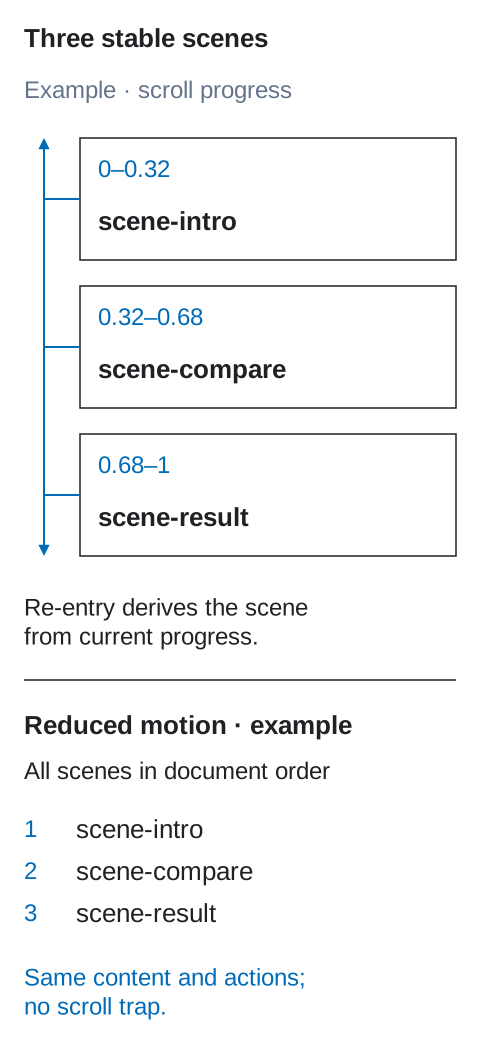
Describe the stable scenes first, then the transitions and the conditions that drive them.
Start with purpose and stable states
Section titled “Start with purpose and stable states”Every motion sequence must have a purpose: preserve spatial continuity, explain causality, direct attention, show progress, confirm an action, or tell a deliberate story. Decorative motion may not delay or obscure a task.
First design the meaningful states without animation:
feature-story scene-intro scene-compare scene-resultEach state must be comprehensible as a still frame. Motion defines how the interface moves between those states. If content is meaningful only while it is moving, the fallback is incomplete.
For an interactive flow, define which event changes the state first. This chapter adds the transition over time; animation must not become the only way to complete the action.
Declare the driver
Section titled “Declare the driver”| Driver | Examples | Contract requirement |
|---|---|---|
| Time | enter, exit, loop, progress | start condition, duration, delay, iterations, end state |
| User event | click, submit, drag, hover, focus | event, input parity, cancel/reverse behavior |
| Scroll | progress through a section or document | source scroller, range, axis, offsets, mapping, re-entry |
| View | element enters or leaves visibility | threshold, root, once/repeat policy |
| Media/data | playback time or live value | clock/source, buffering or missing-data behavior |
| System | route change, connection, preference | trigger, persistence, fallback |
Do not label a sequence merely “on scroll.” Specify whether scroll crosses a threshold, drives continuous progress, or selects discrete scenes.
Timeline contract
Section titled “Timeline contract”For each transition or track, record:
- stable source and destination state identities;
- driver and trigger;
- affected property or semantic change;
- start/end values and units;
- duration or input range;
- delay, easing, iterations, and fill behavior;
- synchronization/sequence relationships;
- transform origin and coordinate space;
- behavior on cancel, interruption, resize, and content change;
- reverse and re-entry behavior;
- reduced-motion and unsupported-platform result.
Prefer animating transform and opacity when that preserves the intended geometry, but performance never overrides semantics, focus, or readable content. Motion tokens may define reusable durations and easing; a story sequence still needs its own state and driver contract.
Keep rich motion out of layer names
Section titled “Keep rich motion out of layer names”Use ordinary stable identities in the design:
story [section=feature-story] story-visual scene-intro scene-compare scene-resultDo not create a flat grammar of [fade], [duration], [easing], [pin], and [scroll-start] tags. Reference the identities from structured DFC Bridge metadata:
Non-standalone module fragment. This excerpt shows only
bridge.motionand intentionally omits required envelope fields. Insert it into the requiredbridgeenvelope from the transfer contract before exchange or full-contract validation.
{ "bridge": { "motion": { "sequences": [{ "sequenceId": "feature-story-scroll", "purpose": "Explain the product workflow in three steps", "driver": { "type": "scroll-progress", "source": "document", "range": { "start": "feature-story block-start 80%", "end": "feature-story block-end 20%" }, "axis": "block" }, "scenes": [ { "id": "intro", "range": [0, 0.32], "content": "scene-intro" }, { "id": "compare", "range": [0.32, 0.68], "content": "scene-compare" }, { "id": "result", "range": [0.68, 1], "content": "scene-result" } ], "pin": { "element": "story-visual", "mode": "sticky", "container": "feature-story" }, "reentry": "derive-from-current-progress", "reducedMotion": "show-all-scenes-in-document-order" }] } }}CSS implementations can map appropriate cases to the CSS Scroll-driven Animations specification; other targets may use another mechanism while preserving the same contract.
Long-scroll stories
Section titled “Long-scroll stories”A long-scroll sequence defines:
- Narrative units: scenes, their stable ids, and the meaning visible in each.
- Scroll source: document or named container; nested scrollers must be explicit.
- Range: start/end offsets and whether they use viewport or container coordinates.
- Mapping: continuous progress, thresholds, snapping, or discrete scene selection.
- Layout: reserved height, sticky/pinned region, and normal-flow content.
- Entry: initial state when reached from above, below, an anchor, or restored history.
- Exit: final state and cleanup in both directions.
- Mutation: recalculation after resize, orientation, font load, localization, or dynamic content.
- Fallback: readable normal flow when scripting, sticky positioning, or scroll timelines are unavailable.
Never assume forward-only scrolling. Scrubbing backward must reverse deterministically or jump to a declared stable state. Loading a deep link midway must not require the user to scroll from the top to initialize the scene.
Sticky and pinned regions
Section titled “Sticky and pinned regions”Prefer native sticky behavior when it matches the design. The contract identifies the containing block, inset, start/end boundary, reserved flow space, stacking/collision policy, and behavior when the pinned object is taller than the available viewport.
Pinned presentation must not:
- reorder meaningful content in the accessibility tree;
- trap wheel, touch, or keyboard scrolling;
- hide focused controls behind headers or overlays;
- duplicate the same readable content into active and inactive copies;
- require a particular device height to reach the next section.
Use document order as the semantic and keyboard order. Visual layers may overlap it; they may not replace it.
Re-entry, reverse, and interruption
Section titled “Re-entry, reverse, and interruption”For every sequence decide:
- repeat: once per session, once per view, or every entry;
- re-entry: restart, resume, derive from current driver, or remain completed;
- reverse: mirror the forward timeline, use another transition, or change immediately;
- interruption: complete, cancel, blend from the current value, or preserve progress;
- rapid input: debounce, queue, replace, or ignore—with a deterministic rule;
- route/history restore: reconstruct from URL, saved state, or current scroll position;
- focus entry: reveal the focused target immediately, without waiting for animation.
The implementation must never rely on an animationend event as the only way to reach a required product state: reduced motion, background tabs, and cancellation may bypass it.
Reduced motion and fallbacks
Section titled “Reduced motion and fallbacks”DFC Bridge requires a reduced-motion design even when WCAG conformance alone would not force removal of every animation. Use the user’s prefers-reduced-motion preference described by CSS Media Queries.
For each sequence choose a real strategy:
- remove nonessential parallax, zoom, rotation, and large spatial travel;
- replace movement with an instant change or short cross-fade;
- stop automatic looping and expose a control when motion is essential;
- render long-scroll scenes in normal document order;
- keep progress, completion, focus, and target state identical.
“Reduce duration to almost zero” is not a complete strategy if scroll capture, flashing, pinned layout, or hidden content remains. With scripts disabled or APIs unsupported, all essential content and actions must still be present.
Responsive motion
Section titled “Responsive motion”Motion follows the same-tree rule. Layout coordinates and path lengths may adapt; identities, purpose, state effects, and completion semantics remain the same.
If narrow presentation replaces a pinned story with a disclosure list or static sequence, declare a responsive transformation: map every scene, preserve reading/action order, define focus and history behavior, and give both presentations the same reduced-motion outcome.
Motion review gate
Section titled “Motion review gate”Review the sequence against these questions. The answers establish its motion contract, not a Ready result for the whole page:
- What purpose does it serve and which stable states exist without it?
- What drives progress, and what are the exact ranges and timing?
- What happens on reverse, re-entry, rapid input, resize, and deep linking?
- Can users pause or stop moving content where required?
- Is meaningful order intact during sticky/pinned presentation?
- Does keyboard focus remain visible and land on an already rendered target?
- Does reduced motion preserve content, actions, state, and task completion?
- Does the fallback work without the preferred animation mechanism?
Apply the WCAG 2.2 pause, stop, hide criterion and the three flashes criterion to every final implementation.