


Page routing and views
Start by identifying which frames describe the same page. Then record its real address, the states users can encounter, and the sections links can reach. This keeps an empty catalog from becoming a fictitious page and a mobile layout from becoming a second route.
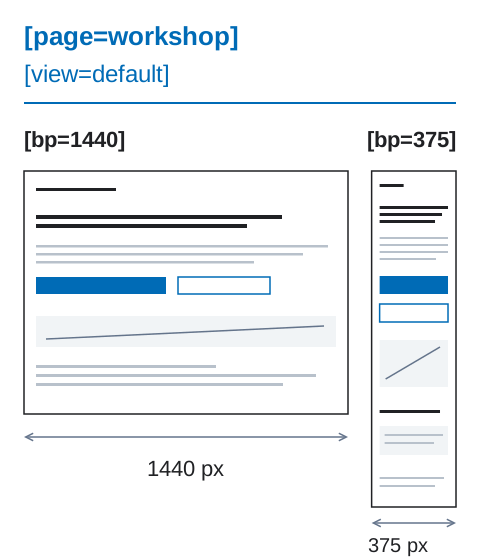
In the visual introduction, two workshop roots share a page and a view; only their declared widths differ.
Page identity and optional route
Section titled “Page identity and optional route”A page root always needs a stable [page=...]. A route is added only when the real production URL or route pattern is known.
Known route:
contacts [page=contacts] [route=/contacts] [bp=1200]contacts [page=contacts] [route=/contacts] [bp=320]Draft route unknown:
contacts [page=contacts] [bp=1200] [view=default]contacts [page=contacts] [bp=320] [view=default]Rules:
[page=...]is the stable page identity.[route=...]is a production URL path, not a guess and not a placeholder.[route-pattern=...]is a real production route template.- if the route is not known yet, omit it; the missing route is a Draft TODO, not a hard error.
- all breakpoints/views of one routed page share the same route when the route is known.
- route is unique across the site unless the page is an intentional route template.
Route syntax
Section titled “Route syntax”Recommended route forms:
[route=/][route=/contacts][route=/catalog][route=/catalog/product][route-pattern=/catalog/:slug]Rules:
- use
[route=...]only for concrete production pages; - use
[route-pattern=...]only for real templates such as product detail pages; - do not invent fake routes to satisfy a checklist;
- avoid trailing slashes except for root
/unless the product explicitly requires them; - route values are case-sensitive in the contract, but lowercase kebab-case paths are recommended.
Page views
Section titled “Page views”[view=...] describes a page/data state, not a component UI state.
catalog [page=catalog] [route=/catalog] [bp=1200] [view=default]catalog [page=catalog] [route=/catalog] [bp=1200] [view=empty]catalog [page=catalog] [route=/catalog] [bp=1200] [view=loading]catalog [page=catalog] [route=/catalog] [bp=1200] [view=error]Common page views:
defaultemptyloadingerrorfilterednot-foundunauthorizedsuccessRules:
- every page should have
view=default; - dynamic pages and collection pages should define empty, loading, and error views when applicable;
- all views of the same page share
[page=...]and the same[route=...]when the route is known; - views may have state-specific content, but responsive breakpoints of the same view must not change content.
- responsive identity, type, parent, cardinality, and content checks run inside one view only;
view=defaultis never compared as a responsive counterpart ofview=emptyorview=error. - the breakpoint set is shared by the page contract: every declared view needs a root for every required page breakpoint.
Bad page-state modeling
Section titled “Bad page-state modeling”Do not model page states as fake pages or fake routes:
catalog [page=catalog] [route=/catalog] [view=default]catalog-empty [page=catalog-empty] [route=/catalog-empty]Correct:
catalog [page=catalog] [route=/catalog] [view=default]catalog [page=catalog] [route=/catalog] [view=empty]If the production route is unknown, keep one page identity and omit route:
catalog [page=catalog] [view=default]catalog [page=catalog] [view=empty]Sections and anchors
Section titled “Sections and anchors”Addressable sections use [section=...] and [anchor=...]:
contacts-faq [section=contacts-faq] [anchor=faq][section=...] is the reusable section/component contract. The human layer name may be page-specific:
catalog [section=product-slider]related-products [section=product-slider]recommended-products [section=product-slider]hero [section=home-hero]In the first three examples, content/data differs, but an adapter can implement the block with one section component. home-hero is an example of a page-unique section.
Rules:
- do not write
Section /in the layer name when[section=...]is present; [section=...]should stay stable across breakpoints of one page;- the same
[section=...]on different pages may have different headings, data, and content; - anchors are unique inside one page route or page identity;
- the same section identity should keep the same anchor across breakpoints;
- anchors are part of navigation and should not be invented by implementation later.
Links and href resolution
Section titled “Links and href resolution”Known links use href as the only destination truth and do not need [link=...]:
contacts [href=/contacts]faq [href=/contacts#faq]same-page-faq [href=#faq]telegram [href=https://t.me/company]If the destination is unknown, use [link]:
contacts [link]Do not use [href=#] as an unknown placeholder. #faq is a real same-page anchor; # alone is invalid.
Validator resolution:
href=/contacts -> page with [route=/contacts]href=/contacts#faq -> page [route=/contacts] + section [anchor=faq]href=#faq -> current page + section [anchor=faq]href=https://... -> external URL, no internal route requiredIf a target page is still missing its route because the design is in draft, route resolution can remain a TODO. Once [route=...] is present, it must be the production URL.
View and breakpoint scope
Section titled “View and breakpoint scope”Uniqueness scope for top-level page roots with known routes:
page + route + bp + viewIf route is unknown in draft, use:
page + bp + viewExample:
catalog [page=catalog] [route=/catalog] [bp=1200] [view=default]catalog [page=catalog] [route=/catalog] [bp=320] [view=default]catalog [page=catalog] [route=/catalog] [bp=1200] [view=empty]catalog [page=catalog] [route=/catalog] [bp=320] [view=empty]Validator rules
Section titled “Validator rules”A DFC Bridge validator should report:
- page root has no route as Draft TODO, not a hard error;
- route value is not a production URL/path when route is specified;
- duplicate concrete routes;
- same page identity uses different known routes across breakpoints;
- same page view is missing on required breakpoint;
- dynamic collection page has no empty/loading/error view;
[href=#]is used as an unknown placeholder;- internal href route does not exist when route data is known;
- internal href anchor does not exist;
- same-page anchor href has no matching section in current page;
- anchor is duplicated inside one page route/page identity;
- page state is modeled as a separate fake route.