


验证与自动检查
验证把准备好的源设计转化为具体问题和待解决决策。先选择页面或所选区块范围,再修复问题、重新检查,并复核工具未覆盖的部分。本页解释检查边界和更广泛的验证模型,不代表插件已经执行下面的全部规则。
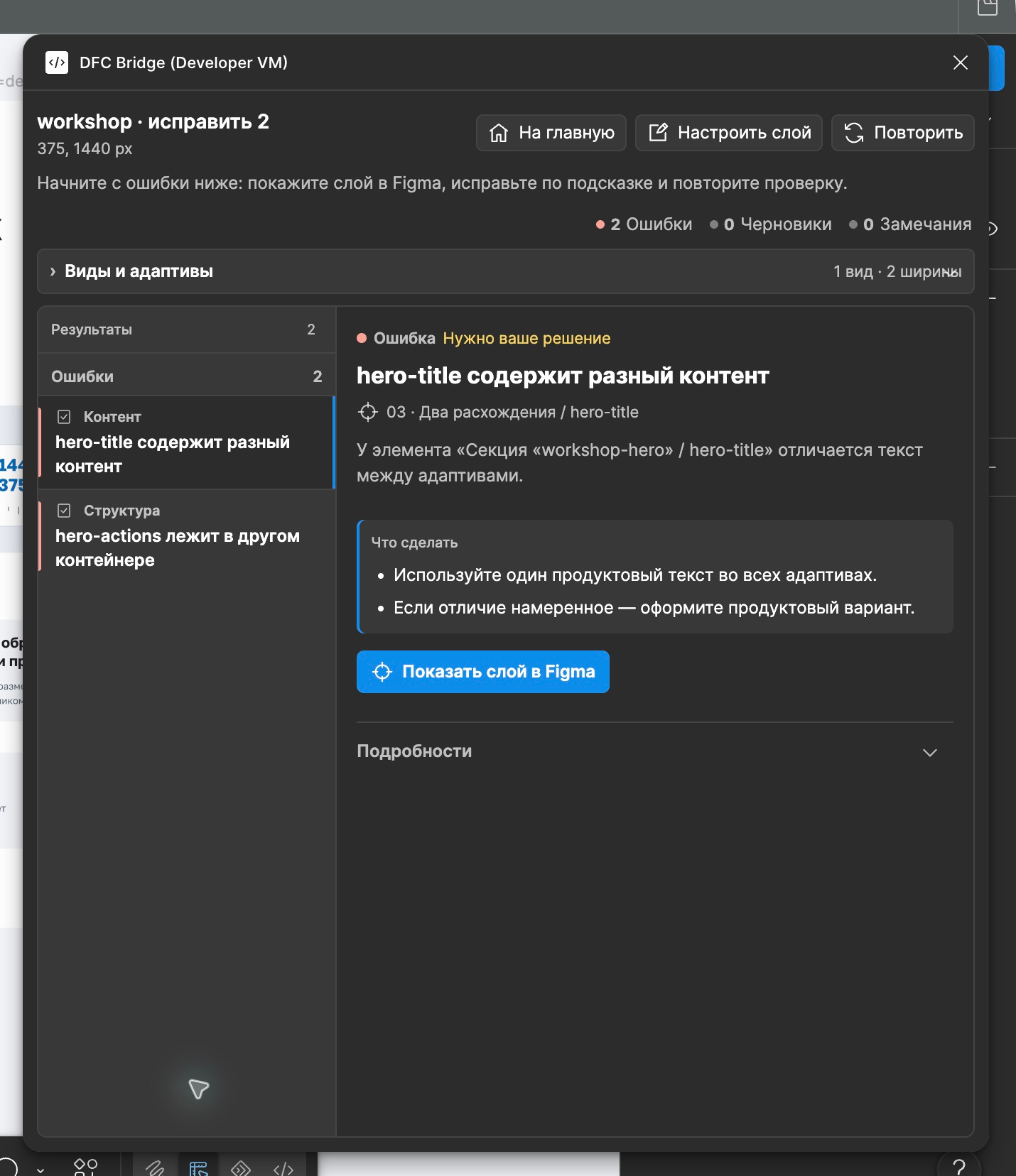
图解入门说明这些决策为什么对团队重要。
验证层
标题为“验证层”的章节这些层级用于组织方法论规则。当前覆盖范围区分了已实现的源检查,以及需要结构化数据、实际实现或人工判断的检查。
- 语法验证 — 标签、布尔视觉意图/草稿标志、可选标签值、键、href/action 语法、断点标签。
- 身份验证 — 身份唯一性、身份稳定性、断点中性身份值、类型稳定性以及从身份标签计数中正确排除
[decor]/[asset]标志。 - 响应式验证 — 标识覆盖、树结构和节点数量、父子关系稳定性、可见性变化、视觉意图漂移、内容漂移、顺序变化、断点完整性。
- 结构验证 — 页面/区块/内容容器的 Auto Layout、资源边界外禁止的 GROUP 节点、包装层、裁切、定位意图、固定高度、重叠。
- 交互图验证 — href 链接、草稿链接/控件标记、操作、目标、模态框、状态、表单。
- 内容验证 — 文本一致性、严格的法律/价格内容、富文本、本地化风险;装饰视觉或整体资源根内的文本不参与产品文案漂移检查。
- 资源验证 — 资源策略、原生文本误用、导出设置、视觉焦点。
- 无障碍验证 — 对比度风险、触摸目标、标签、可聚焦状态,以及装饰层是否已从无障碍树中隐藏。
- 适配器能力验证 — 目标平台不支持的功能。
自动化水平
标题为“自动化水平”的章节- 自动 — 可以从提取的设计数据中进行确定性检查。
- 启发式 — 工具能够识别可疑情况,但可能需要设计师确认。
- 手动 — 必须由人工检查,但检查表应明确说明。
报告严重性
标题为“报告严重性”的章节- error(错误) — 阻止已检查范围被判定为就绪。
- warning(警告) — 正式交付前需要解释或修复。
- info(信息) — 为实现者和适配器提供有用的上下文。
最小验证器管道
标题为“最小验证器管道”的章节extract design tree -> normalize names, boolean visual-intent tags, optional tag values, keys, and Figma metadata -> discover page roots among direct Figma-page children and through native Figma SECTION organizers only -> group roots by page, then by view, then by breakpoint -> build identity map and type map -> check optional identity-bearing values against current breakpoint names/widths -> compare responsive tree cardinality and parent identities only inside one page/view group -> compare visibility, sibling order, and visual-intent flags inside each parent -> compare product content across breakpoints, excluding decorative/root asset visuals -> classify page, section, generic content-container, primitive/leaf, component-instance, and opaque asset boundaries -> inspect native node type and layout mode; require Auto Layout and reject non-asset GROUP nodes -> validate exact-node absolute decor/overlay intent without treating [decor] as a structural exemption -> classify remaining wrappers and positioning intent -> build href/action-target graph -> inspect geometry, overflow, and fixed heights -> check assets and component states -> emit report with rule IDs, severity, location, and fix hints原生 Figma Section 仅在查找页面根时作为可穿透的画布组织容器。验证器不会继承其名称/标签,不会将它纳入 DFC Bridge 页面树,也不会用它豁免布局规则。查找遇到普通 FRAME/GROUP 包装层就停止;随后只验证找到的带标签页面根及其子树。
检查所选区块
标题为“检查所选区块”的章节**Check selected section(检查所选区块)**是用于旧有/非 DFC Bridge 宿主内新建区块的独立审核模式,不能通过伪造页面元数据来运行页面检查流程。
read explicit selection -> resolve each selected node to its nearest own/ancestor [section=<stable-id>] boundary -> reject empty/untagged selection, a page root, mixed section ids, or a section below an inherited [asset] as Blocked scope -> deduplicate normalized roots; traverse only those roots and descendants -> treat [asset] as opaque, descendant INSTANCE as a trusted atomic boundary, and [decor] as traversed intent -> run local identity, syntax, structure, content, and internal-target checks -> compare only explicitly selected variants of one section when 2+ usable roots exist -> defer only references that require lookup outside selected roots plus file/page/integration concerns -> emit scope-qualified Ready, Partial, or Blocked plus a persistent coverage matrix可编辑的 FRAME 或 COMPONENT 根会接受完整子树检查。选中的 GROUP 可以被识别为检查根,以便报告阻塞错误 layout.group-outside-asset;它在不透明资源之外不能成为 Ready。若所选区块根本身是 INSTANCE,只能提供边界证据,因此结果是 Partial。普通后代组件实例是受信任的原子边界:其内部不适用于本次遍历,不会降低 Ready。恰好选中的 [section=id] [asset] 根有效且不透明,其内部布局检查不适用。位于另一个资源祖先内的区块会在遍历前判为 Blocked;祖先的不透明边界不能用来获得豁免。单独的 [decor] 永远不会停止遍历。
一个识别后的根代表一个请求的上下文;该上下文没有待处理问题时可以是 Ready。用户未请求的变体标为 not requested,不是 Partial,也不是缺少断点错误。明确选中的两个或更多根必须具有同一区块 ID,才作为声明的所选变体。由根/容器宽度推断的上下文标签必须注明来源是推断;验证器不会擅自查找相邻旧画框来扩大覆盖范围。
| 覆盖等级 | 所选区块的含义 |
|---|---|
| 本地 | 所选子树可以验证本地标签/标识、action/href 语法、源结构、内容证据、根内目标,以及完整有效的 http:、https:、mailto:、tel: href 值。不完整或格式错误的外部值会阻塞检查,不能标为 Deferred。 |
| 所选变体 | 只在明确选中的可比较变体之间检查标识/类型、逻辑树/节点数量、父子关系、产品文案和视觉意图。 |
| 待验证 | 需要在选定根之外查找的内部路由/锚点和操作/组件/数据目标,以及页面根、页面/视图/路由完整性、所需的页面断点、全局唯一性、主机放置、页面语义、运行时、生产无障碍和 WCAG 一致性需要单独的证据。 |
已实现的规则 ID 和适用条件以所选区块覆盖清单为准。它独立于 Page Check 统计;两个范围重叠,规则数量不能相加。
规则目录概述
标题为“规则目录概述”的章节机器可读的规则目录位于 ../validator/rules.json 中。
| 分组 | 规则示例 | 严重性 | 自动化 |
|---|---|---|---|
| 身份 | identity.missing-stable-identity |
错误 | 自动 |
| 身份 | identity.same-identity-different-type |
错误 | 自动 |
| 身份 | identity.breakpoint-specific-id |
错误 | 自动 |
| 身份 | identity.decor-asset-flags-not-identities |
错误 | 自动 |
| 身份 | identity.multiple-identity-tags |
警告 | 自动 |
| 语法 | syntax.decor-asset-value-not-kebab-case |
错误 | 自动 |
| 语法 | syntax.identity-value-not-kebab-case |
警告 | 自动 |
| 语法 | syntax.duplicate-tag |
错误 | 自动 |
| 语法 | syntax.figma-metadata-tag-invalid |
错误 | 自动 |
| 结构 | layout.page-root-missing-auto-layout |
错误 | 自动 |
| 结构 | layout.page-root-cannot-be-asset |
错误 | 自动 |
| 结构 | layout.section-missing-auto-layout |
错误 | 自动 |
| 结构 | layout.container-missing-auto-layout |
错误 | 自动 |
| 结构 | layout.group-outside-asset |
错误 | 自动 |
| 结构 | layout.positioned-without-intent |
警告 | 自动 |
| 区块 | section.component-source-unclassified |
警告 | 启发式 |
| 区块 | section.redundant-instance-section-tag |
警告 | 启发式 |
| 组件 | component.ui-kit-used-as-section |
警告 | 启发式 |
| 响应式 | responsive.identity-missing-in-required-breakpoint |
错误 | 自动 |
| 响应式 | responsive.view-missing-required-breakpoint |
错误 | 自动 |
| 响应式 | responsive.tree-cardinality-changed |
错误 | 自动 |
| 响应式 | responsive.parent-changed-across-breakpoints |
错误 | 自动 |
| 响应式 | responsive.visual-intent-drift |
错误 | 自动 |
| 内容 | content.text-changed-between-breakpoints |
错误 | 启发式 |
| 内容 | content.decorative-asset-text-excluded-from-product-drift |
信息 | 自动 |
| 内容 | content.manual-line-break-in-dynamic-text |
错误 | 启发式 |
| 结构 | layout.one-child-wrapper-without-role |
警告 | 启发式 |
| 结构 | layout.overlap-without-overlay-role |
警告 | 启发式 |
| 交互 | interaction.clickable-without-action |
警告 | 启发式 |
| 交互 | interaction.link-without-href |
信息 | 自动 |
| 交互 | interaction.control-without-action |
信息 | 自动 |
| 交互 | interaction.href-placeholder-invalid |
错误 | 自动 |
| 交互 | interaction.href-invalid |
错误 | 自动 |
| 交互 | interaction.optional-id-value-invalid |
错误 | 自动 |
| 交互 | interaction.action-invalid |
错误 | 自动 |
| 交互 | interaction.control-action-duplicate |
错误 | 自动 |
| 交互 | interaction.modal-target-missing |
错误 | 自动 |
| 交互 | interaction.form-target-missing |
错误 | 自动 |
| 交互 | interaction.reset-target-missing |
警告 | 自动 |
| 路由 | routing.page-route-missing |
信息 | 自动 |
| 路由 | routing.page-root-required |
错误 | 自动 |
| 路由 | routing.default-view-missing |
警告 | 自动 |
| 路由 | routing.route-not-production-url |
错误 | 自动 |
| 高度 | height.fixed-height-without-reason |
警告 | 自动 |
| 溢出 | overflow.text-clipping-risk |
错误 | 启发式 |
| 资源 | asset.raster-text-without-reason |
错误 | 启发式/手动 |
| 无障碍 | accessibility.decorative-layer-exposed |
警告 | 自动 |
| 交互 | interaction.form-field-missing-label |
警告 | 自动 |
对于 layout.section-missing-auto-layout,“自动”指审核树中带有 [section] 的非页面 FRAME 或 COMPONENT。已放置的 INSTANCE 作为原子边界处理:Page Check 不会解析它的源组件,也不会对该实例报告区块布局错误。请另外选择可编辑的组件源树进行审核。
建议的报告格式
标题为“建议的报告格式”的章节{ "methodology": "DFC Bridge", "status": "not-ready", "summary": { "errors": 3, "warnings": 8, "info": 4 }, "issues": [ { "ruleId": "interaction.modal-target-missing", "severity": "error", "nodeId": "contact-cta", "breakpoint": 320, "message": "Button references modal `contact-modal`, but no modal target exists.", "fix": "Create `[modal=contact-modal]` or change the action." } ]}区块范围的报告应包含检查边界和未完成的证据,不能只列问题数量:
{ "methodology": "DFC Bridge", "mode": "section", "status": "partial", "scope": { "kind": "section", "rootIdentity": "checkout-summary", "boundary": "selected-subtree", "readinessClaim": "section-source-only" }, "coverage": { "evaluated": ["local-structure", "local-syntax"], "notRequested": ["selected-variant-comparison"], "deferred": ["file-resolved-targets", "host-integration"] }, "issues": []}Ready 要求声明的所选范围内没有错误、警告/TODO、所选根的源证据缺口或待验证检查;受信任的后代实例和未请求变体不会降低它。Partial 表示没有本地阻塞错误,但仍有所选根 INSTANCE、无法区分的所选上下文,或其他警告/待验证缺口。Blocked 表示标签边界缺失/无效、根相互嵌套/区块 ID 混用,或存在阻塞问题。这些状态都不代表页面、实现、产品或 WCAG 已就绪。
清单模式
标题为“清单模式”的章节设计师快速检查
标题为“设计师快速检查”的章节在向工程人员展示文件之前使用:
- 身份缺失;
- 缺少动作;
- 明显的固定高度文本;
- 缺少模态框/状态目标;
- 移动端文案发生变化。
审核者严格检查
标题为“审核者严格检查”的章节批准交付前使用。按规则声明的自动、启发式或人工方式审核下列内容;这不是一个插件“执行全部规则”命令:
- 完整的规则目录;
- 边缘情况清单;
- 状态覆盖范围;
- 无障碍警告;
- 适配器功能说明。
适配器认证检查
标题为“适配器认证检查”的章节用于证明目标实现路径支持 DFC Bridge:
- 支持的标签;
- 支持的操作;
- 不支持的视觉功能;
- 资源替代方案行为;
- 响应式映射规则。
哪些问题应立即阻止交付
标题为“哪些问题应立即阻止交付”的章节- 重要元素上缺少稳定的身份。
- 断点/视图范围内的重复身份。
- 比较不同
[view=...]值的响应树。每个视图都是一个单独的响应式合约,并且仅在其自己的断点之间进行比较。 - 断点特定的可选标识值,例如
[bp=375]根内的[control=button-reviews-box-375]。 - 相同的标识用于不同的逻辑类型。
- 页面根目录禁用了原生自动布局;零/一个子级、
[asset]、[decor]或页面根目录上的异常元数据不会抑制该规则。 - 页面根带有
[asset]。这是独立的阻塞错误,不会创建不透明边界,也不会停止后代验证。 - 由框架构建的区块禁用了原生自动布局,除非该确切部分是合法的不透明整体视觉
[asset],没有实时内容流。 - 当禁用自动布局时,支持通用自动布局的容器具有两个或更多可见的、有意义的直接流子级。
- Figma
GROUP存在于不透明[asset]子树之外。手动布局加原因记录了建议的偏差,但不能抑制结构错误。 - 在所需的断点上缺少稳定的装饰/资源根标识。
- 响应式元素树的节点数量或父子关系变化,却没有声明结构例外。
- 视觉意图漂移,例如桌面上的
sneg [decor] [asset]在移动设备上变成普通的sneg。 - 没有已知
[href=...]或[action=...]的最终可点击元素;草稿[link]/[control]标记是 TODO,而不是语法错误。 - 无效的未知 href 占位符
[href=#];使用[link]代替。 - 虚假或占位符
[route=...]值;省略路由,直到知道生产 URL。 - 操作目标缺失。
- 模态框没有关闭行为。
- 文本使用固定高度却没有溢出策略。
- 依赖于手动换行符的动态文本。
- 隐藏的带标识图层被用作事实来源。
- 没有明确原因的光栅化文本。
没有已知路由的页面根是草稿 TODO(routing.page-route-missing),不是阻塞错误。同样,草稿 [link] 和 [control] 是合法的待完成决策标记,并不证明交互已就绪。
误报是可以接受的
标题为“误报是可以接受的”的章节验证器应优先暴露需要确认的情况,而不是静默漏过问题。如果报告说明了如何记录有意的例外,误报可以接受:
[bridge-exception=overlay] [reason=decorative-layered-composition]目标不是禁止复杂设计,而是让复杂性明确可见。即使存在 [bridge-exception=manual-layout] [reason=...],仍会报告 Auto Layout/GROUP 结构错误;这些标签只为独立的偏差审批关口提供证据,不会让 Page Check 自动通过。[bridge-exception=overlay] [reason=...] 可以说明该具体绝对定位叠层节点的定位意图。